
By and far the biggest mistake that many businesses make is not managing their customers and orders properly. In this week's lesson we look at how to manage the orders that come in both online and in the workshop.
Most of the order management is done for you by Flower Store In a Box. When an order is received by the website an email is sent to the admin email address of your site with a copy of the order.You can then log in to the site and manage the order. In this section we look at how to manage the order process and use the inbuilt order management functionality of Flower Store In a Box.
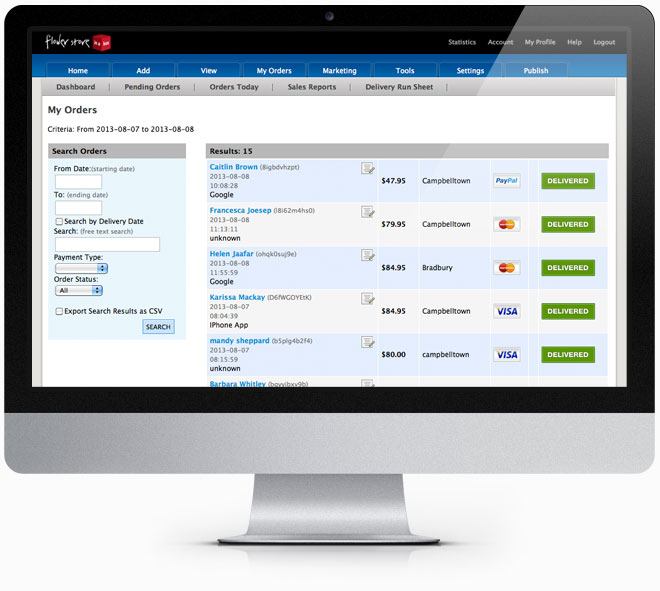
When an order is placed on your website you will receive an email notification. The email notification should not be relied on as your only means of order confirmation and you should log in to Your website dashboard to review and action the order. Sometimes for various reasons email notifications may not get through, and you check your pending orders in Your website dashboard on a regular basis.
To review an order in Your website dashboard you log in and then click the Shopping Cart icon. You will see in your dashboard a red number, that indicates how many pending orders you have. To view the pending orders, click on the Manage Orders Dashboard item. In this screen you can search for orders by date range, order id or recipient name. In the view of all pending orders you can see:
To view an order click on the Recipient's name and the order details will open in a new window. The first thing you should do is match the billing country to the IP address country at the bottom of the order, if these are different or you suspect that the order is fraudulent, please contact the person ordering.
For more details on Identifying Fraudulent orders read this information.
This order page can also be printed out as a 'Pick and Pack' for assembling the order. You may also want to fax the order to your relay network if you do not service the delivery location.
Credit Card fraud is on the increase especially online where the merchant does not have to actually see the credit card. To help address this we have added a special feature at the bottom of the order display page that shows the country of origin of the order by a reverse lookup of the customer's IP address.
To view the IP and Country details, log into Your website dashboard and click on the Recipients Name in your shopping cart. At the bottom of the order details you will see the IP address block.
In addition to looking at the Country of order suspicious orders may be identified by:
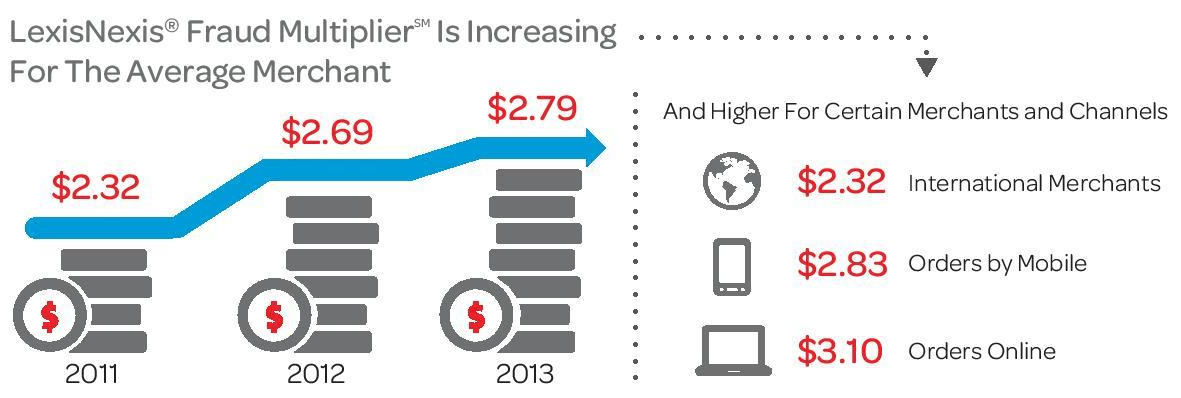
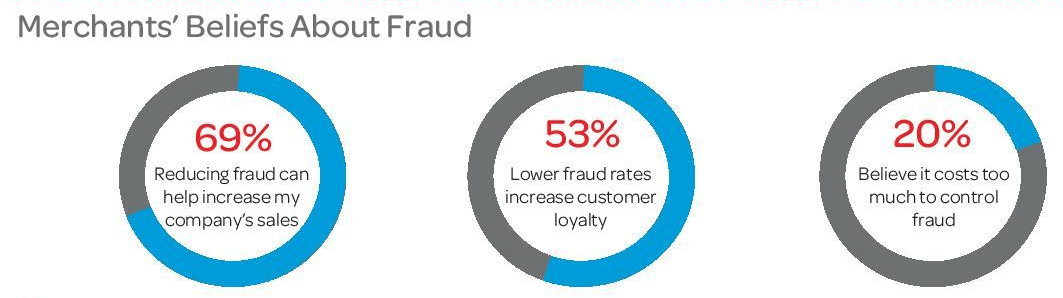
IP Address is from one of the many countries where Internet Fraud is rife such as Nigeria, Ghana, The Ukraine etc.
If you are in doubt about an order ring both the Recipient and the Sender and speak to them.
As a merchant YOU are responsible for a fraudulent transaction so if in doubt check it out.
Quick Links
Features