Earlier this week we showed you how Bloomkeeper gets your website ready for Christmas: your closed days, pop ups, banners and Christmas page. If you missed it, you can read it here.
Now for the other half: bringing in the orders. Our Christmas marketing campaigns are live. They're ready-made campaigns with the emails, offer, banner, pop up and text all planned out and timed for the lead-up to Christmas. Bloomkeeper sets one up with you, with suggested words you can use as they are or change.
Christmas isn't a huge time of year for most florists, but the opportunities are there: table centres, wreaths, hampers, corporate gifts and last-minute presents. A few well-timed emails to the customers you already have is the easiest way to win them.
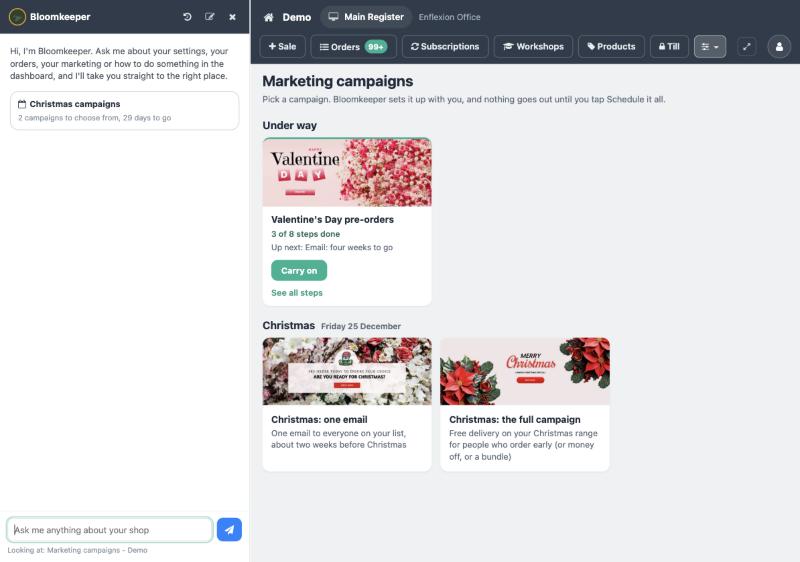
The Marketing campaigns screen, with Bloomkeeper open on the left.
Why marketing your website matters
A great website is only half the job. Most of your customers won't think to visit it until something reminds them. Christmas, Valentine's Day and Mother's Day orders go to the florist who gets in front of people first, and too often that's a big online relay or a supermarket.
The good news is you already have the best audience there is: your own customers. They know you, they've bought from you before, and reaching them by email costs next to nothing compared with ads. Every order that comes straight to your website is an order with no relay commission and a customer who comes back.
The problem has never been knowing this. It's finding the time to plan it, write it and send it at the right moment, in the busiest weeks of the year.
Our approach to marketing campaigns
So we've done the planning for you. Each campaign is built around one occasion and follows the same simple idea:
- Start early. The first email goes out a few weeks before the day, when people start thinking about it. An early order offer gets orders in before the rush, so your workload is spread out and you can plan your stock.
- Follow up, but only with people who haven't ordered. The later emails remind the people who haven't ordered yet, so the customers who already have aren't bothered again.
- Make the last days count. A last order day email and an optional text make sure nobody misses out, and tell people your holiday hours.
- Your website matches your emails. A banner and pop up on your website carry the same message and offer, so it's all joined up.
- You stay in control. The words are written for you, but every one can be changed, and nothing goes out until you tap Schedule it all.
It all runs from your own website and your own customer list, inside your dashboard. No extra tools, no extra subscriptions.
Your customer list, your email and your texts, all in one place
We're bringing our customer management (CRM) together with email and SMS marketing. Your customer list is built from every order: online, in store through the Point of Sale, and over the phone. Now that same list drives your emails and texts.
That means you can target people in real detail, not just send to everyone. For example:
- People who haven't ordered for Christmas yet
- People who ordered for Christmas last year, but not this year
- People who haven't ordered in six months
- Your best customers, by how much they've spent
- Your members by level, or anyone with a tag you've given them, like corporate
You can describe who you want in your own words, like "people who bought for Mother's Day last year but not this year", and Bloomkeeper sets it up and tells you how many people it reaches. Save it, and use it again for your next email or text.
This is where the real value is. The right message to the right people means more orders, fewer unsubscribes, and no annoying the customers who've already ordered. The Christmas campaigns use it already: the follow-up emails and the text only go to people who haven't ordered for Christmas yet.
Two Christmas campaigns to choose from
Christmas: the full campaign
For florists who want to make the most of Christmas. It starts with an offer for people who order early, then follows up with the people who haven't ordered yet.
| When | What | Who it goes to |
|---|
| When you start | Your offer: free delivery on your Christmas range, money off, or a bundle | |
| Fri 4 Dec | A Christmas banner and a pop up with your offer on your website | Your website visitors |
| Fri 4 Dec | Email: three weeks to go | Everyone on your list |
| Sun 13 Dec | Email: gift ideas, with your Christmas products | People who haven't ordered yet |
| Sat 19 Dec | Email: your last order day and holiday hours | People who haven't ordered yet |
| Tue 22 Dec | Text: three days to go (optional) | People who haven't ordered yet |
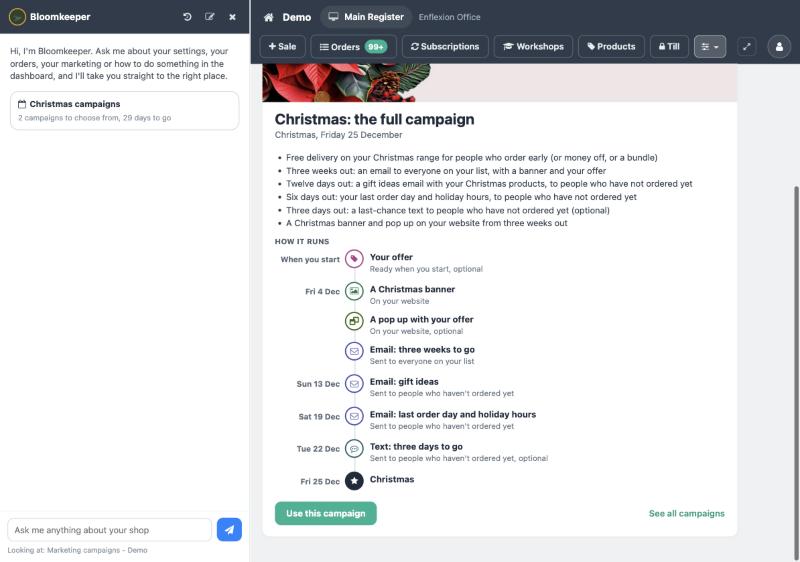
Every step, its date and who it goes to, before you start.
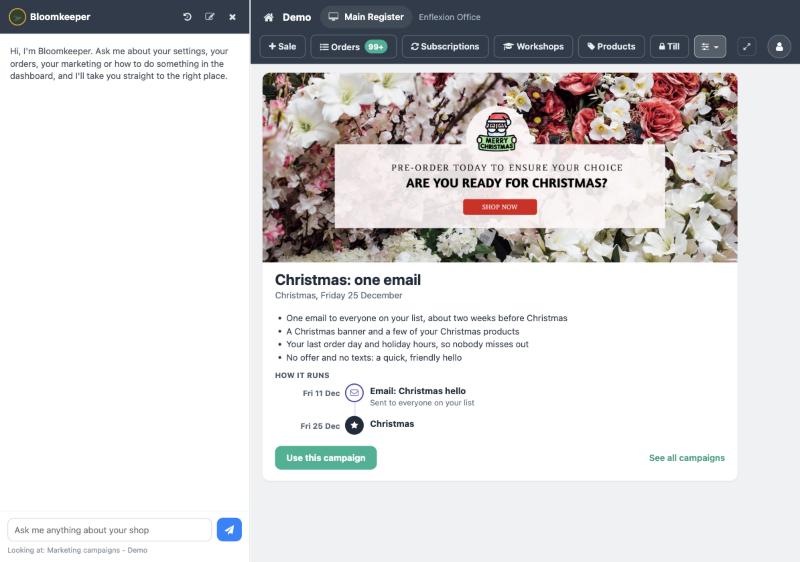
Christmas: one email
For florists who want to keep it simple. One friendly email to everyone on your list on Friday 11 December, with a Christmas banner, a few of your Christmas products, and your last order day and holiday hours so nobody misses out. No offer and no texts.
How it works
- Bloomkeeper walks you through it. One step at a time, the same way as the Christmas website guide.
- The words are written for you. Each email and text comes with suggested wording, already filled in with your shop name, your offer and your last order day. Use it as it is, or change anything you like.
- Your offer is set up for you. Choose free delivery on your Christmas range, money off, or a bundle. Bloomkeeper sets it up on your website and puts it in your emails, banner and pop up.
- "Haven't ordered yet" means just that. The follow-up emails only go to people who haven't placed a Christmas order with you, so your regulars aren't nagged.
- Nothing goes out until you say so. At the end you check everything on one screen and tap Schedule it all. Until then, nothing is sent.
- Starting late is fine. If a step's date has already passed, Bloomkeeper skips it and carries on with the rest.
How to start
Open Bloomkeeper in the new dashboard and tap Christmas campaigns. You'll see both campaigns. Tap View campaign to see one in full, then Use this campaign.
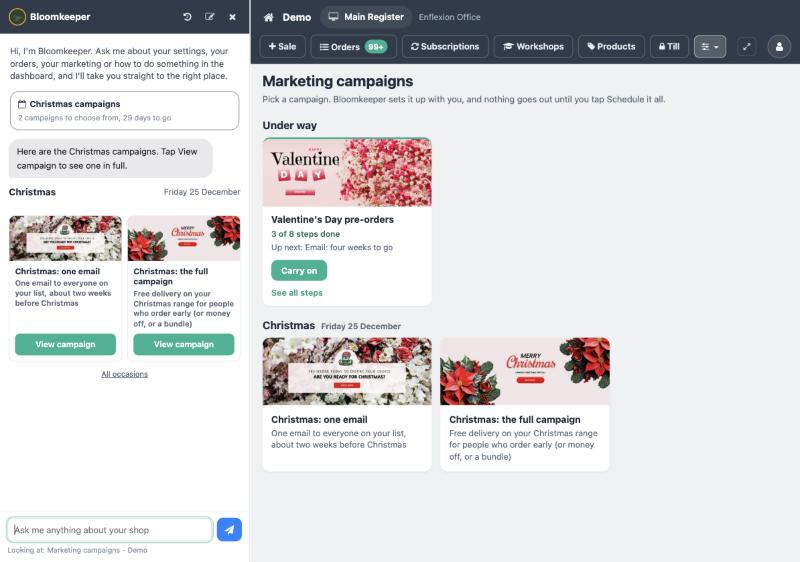
Tap Christmas campaigns in Bloomkeeper to see both.
You can also find them under Settings > Marketing > Marketing campaigns.
Our tip: if you haven't done the Christmas website guide yet, do that first. Your campaign emails link to your Christmas page, so it's worth having your Christmas category, products and closed days sorted before the first email goes out on 4 December.
Christmas is more than marketing
Christmas isn't only about selling. It's also about looking after your customers over the break.
- Tell them when you're closed. Customers need to know your last order day and when you'll be back, before they try to order. The Christmas website guide blocks your closed days and puts a pop up on your website, and the full campaign's last order day email includes your holiday hours.
- Wish them a happy new year. A short thank you at the end of the year means a lot, and keeps you front of mind for Valentine's Day. Send a quick thank you and happy new year email or text to your customers from your email and SMS marketing. We've also added New Year pop ups, including "Closed for the Holidays", "Happy New Year" and "Thank You for a Wonderful Year", to run on your website while you're away.
Valentine's Day, Easter and Mother's Day are ready too
We've also written campaigns for Valentine's Day, Easter and Mother's Day. Bloomkeeper brings each one up in the lead-up to the day, so you'll see the Valentine's Day campaigns from early January.
You'll need the new dashboard
Bloomkeeper and the marketing campaigns are only in the new Point of Sale and dashboard, not the old dashboard. There are two ways to get there:
- Go to Settings > Advanced Settings > Point of Sale in your dashboard.
- Or use the pop up you'll see when you're in the old dashboard. Tap Use the new dashboard and you're straight in.
Help us make Bloomkeeper better
We're still training Bloomkeeper, and it's learning every day. If you can't find something easily, or you have a suggestion, please let us know by creating a support request through Bloomkeeper. Under each answer there's an Ask the team link: tap it, check what will be sent, and tap Send. It goes to our support team, and our reply comes back in Bloomkeeper.
Every request helps us improve the new dashboard for everyone.
Webinars next week
Next week we're releasing a series of pre-recorded webinars on the new dashboard. They walk through how it all works and explain the new features that are already live. Watch them whenever it suits you, and if you have questions, send them to us through Bloomkeeper. We'll let you know as soon as they're ready.
Drew