Christmas isn't a huge time of year for most florists, but the opportunities are there: table centres, wreaths, hampers, corporate gifts and last-minute presents. And it's not just Christmas Day. Most shops close for some of the holiday period between Christmas and New Year, and your website needs to know.
So every year the same jobs need doing: block the days you're closed, tell customers, put your Christmas flowers front and centre, and make sure Google can find them.
This year it's brand new, and it's done in the new Point of Sale and dashboard, not the old dashboard. The new dashboard has our new AI assistant built in. It's called Bloomkeeper, and it walks you through your Christmas setup one step at a time. You'll only find Bloomkeeper and the Christmas guide in the new dashboard.
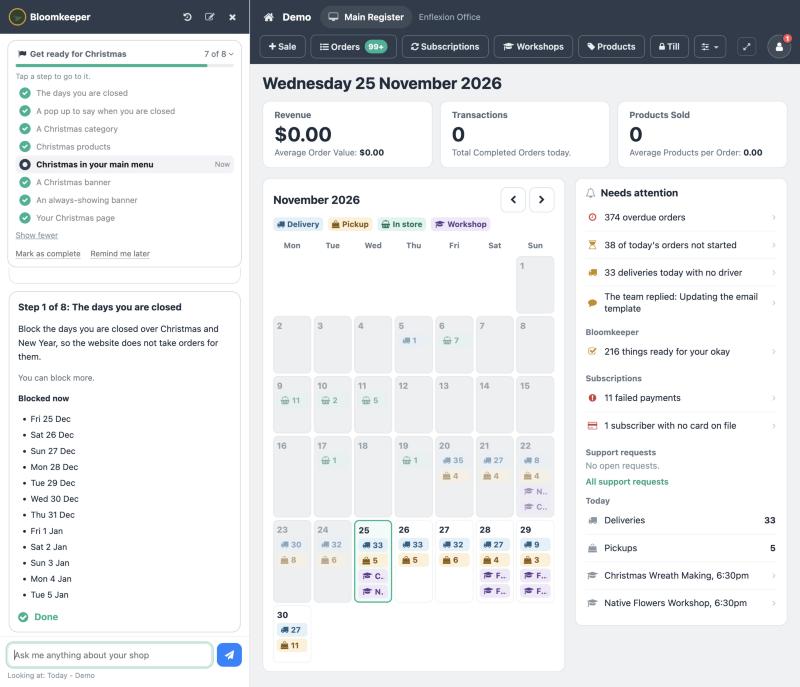
The new dashboard, with Bloomkeeper open on the left and the Christmas guide in progress.
How to start
Open Bloomkeeper in the new dashboard and you'll see Get ready for Christmas. Tap it, or just type "help me get ready for Christmas". There are eight steps. Each one tells you why it matters, what you have now, and gives you a button to do it. Anything you've already done ticks itself off.
Still on the old dashboard? The Christmas guide and Bloomkeeper aren't there. To open the new Point of Sale and dashboard, go to Settings > Advanced Settings > Point of Sale. To switch over for good, ask Bloomkeeper to "turn on the new dashboard".
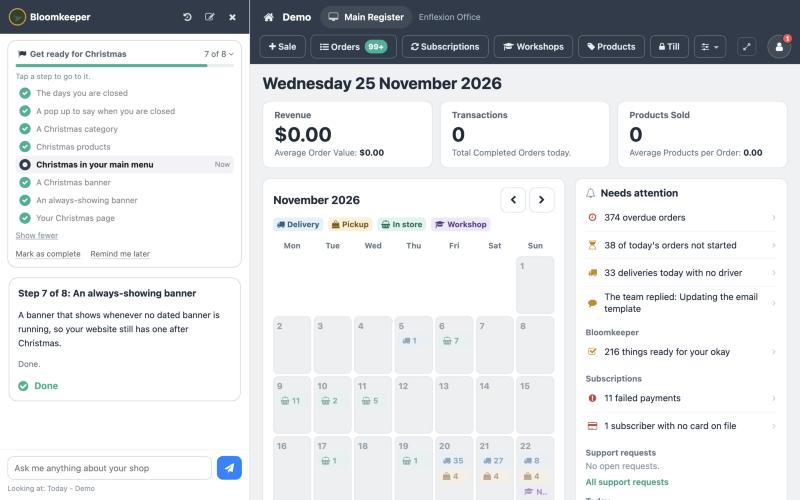
All eight steps in one list. Tap any step to go straight to it.
1. The days you are closed
Tell Bloomkeeper which days you're closed over the holiday period, from Christmas through to New Year. It shows you what's already blocked, and blocks the rest with a tap.
Why it matters: if a day isn't blocked, customers can order for it. That means a delivery booked for Boxing Day while you're at the beach, and an awkward refund when you get back.
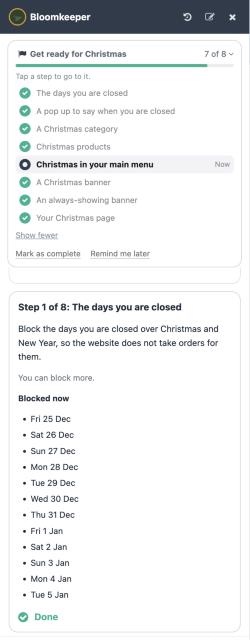
Bloomkeeper lists every day your website won't take orders for.
2. A pop up to say when you are closed
Pick one of our ready-made Christmas pop ups, add your closed days and the last day to order, and you're done. Or make your own with your own picture. Bloomkeeper fills in the dates from your closed days, so the pop up shows from now until you reopen.
Why it matters: customers find out you're closed before they try to order, not after. It saves a lot of phone calls and emails while you're closed.
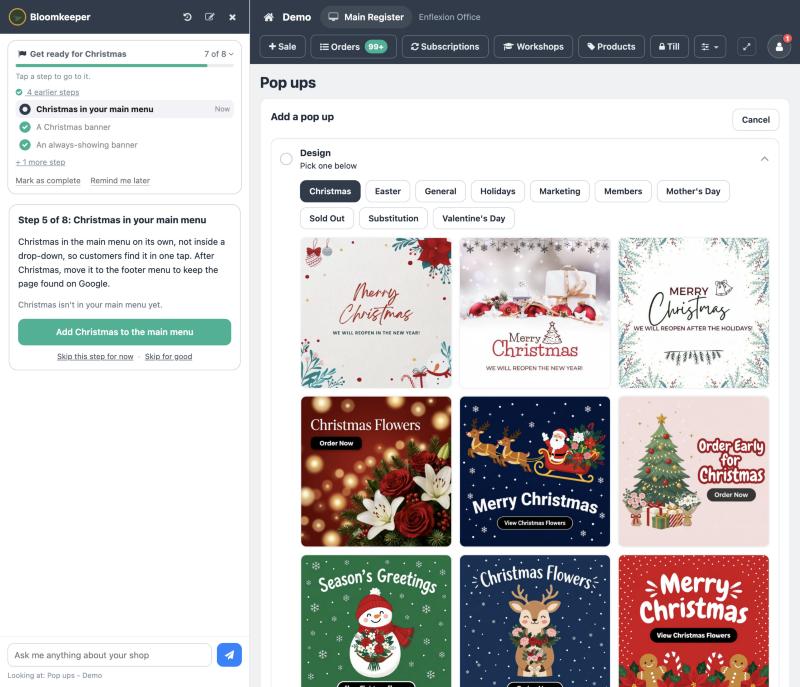
We've added a whole new set of Christmas pop ups this year. Tap one, add your words, choose when it shows.
Our tip: show it once per visit, straight away.
3. A Christmas category
If you don't have a Christmas category, Bloomkeeper adds it with one tap, with its own page address on your website.
Why it matters: customers look for a Christmas section to browse. Without one, your Christmas flowers are mixed in with everything else, and they're much harder to find.
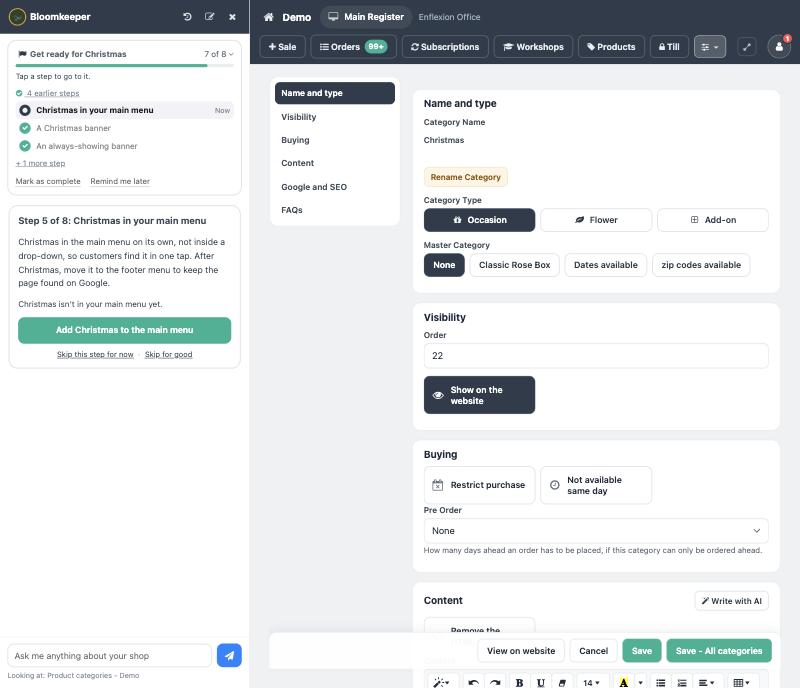
Your Christmas category, set up as an Occasion and showing on your website.
4. Christmas products
Bloomkeeper counts how many products you have in your Christmas category. If it's fewer than six, it suggests adding a few, or moving products you already have into the category.
Why it matters: a category with two products in it looks empty. Customers like at least half a dozen choices: arrangements, hampers and table centres.
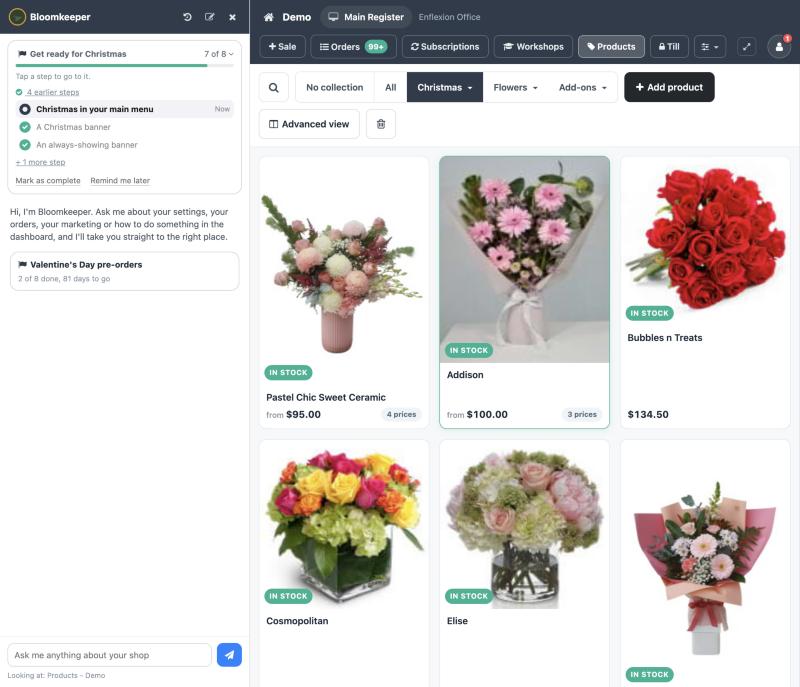
Filter your products to Christmas to see what's in there.
5. Christmas in your main menu
One tap puts Christmas in your main menu, straight after Home. Your website's menu updates straight away.
Why it matters: customers find it in one tap, not buried inside a drop-down. After Christmas, move it to your footer menu instead of deleting it. The page stays live and keeps being found on Google for next year.
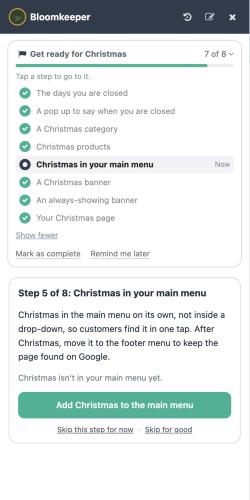
Each step has its own card: why it matters, where you're up to, and one button to do it.
6. A Christmas banner
Choose one of our new Christmas banners and add your words, or make your own with your own picture. Bloomkeeper fills in the dates (1 December to Boxing Day) and links it to your Christmas category.
Why it matters: the banner is the first thing people see on your homepage. It tells them you're ready for Christmas and takes them straight to your Christmas flowers. Because it's scheduled, it comes down on its own when Christmas is over.
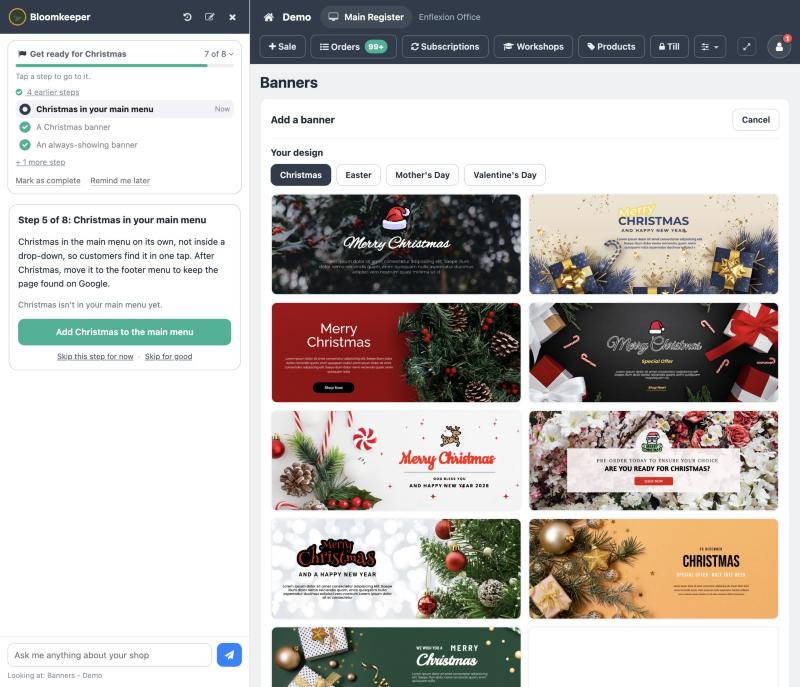
Brand new Christmas banner designs, ready to use.
7. An always-showing banner
An always-showing banner fills in whenever no dated banner is running. If you already have one, this step ticks itself off.
Why it matters: when your Christmas banner comes down on Boxing Day, the top of your website shouldn't go blank. This keeps it looking good all year, between seasons.
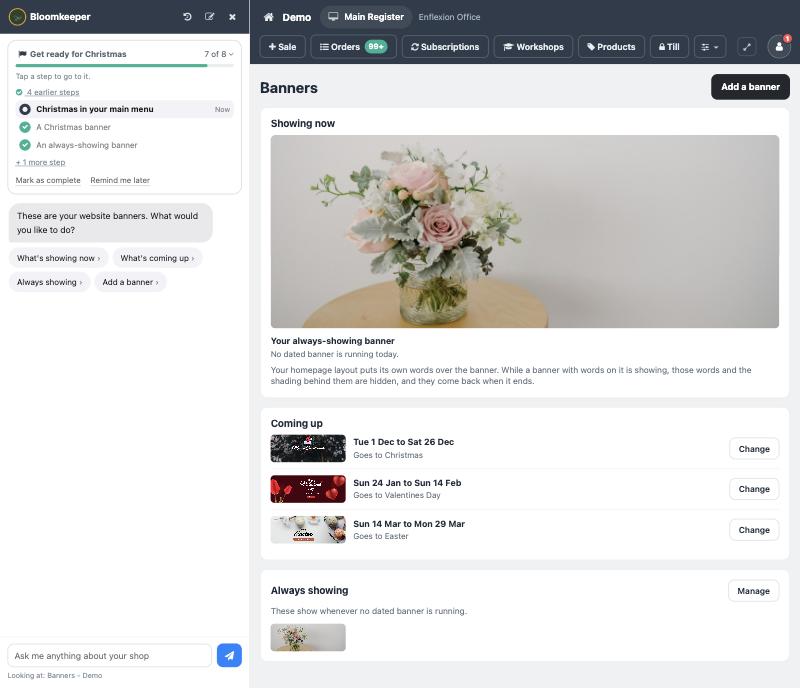
Your banners at a glance: what's showing now, what's coming up, and the always-showing banner behind them.
8. Your Christmas page
Bloomkeeper looks at your Christmas page first: how many words it has, what Google shows for it, and its FAQs. If it's already in good shape, it ticks itself off. If something's missing, it tells you what, and you choose:
- Help me write it: Bloomkeeper asks you a couple of quick questions, like your last day to order, then writes the missing parts for you to check and approve.
- I'll edit it myself: opens just the page's words, Google text and FAQs.
Why it matters: this is the page Google shows people searching for Christmas flowers near them. It needs its own words: what you do for Christmas, where you deliver, and the last day to order. Answers to the questions customers always ask help it get found in AI answers too.
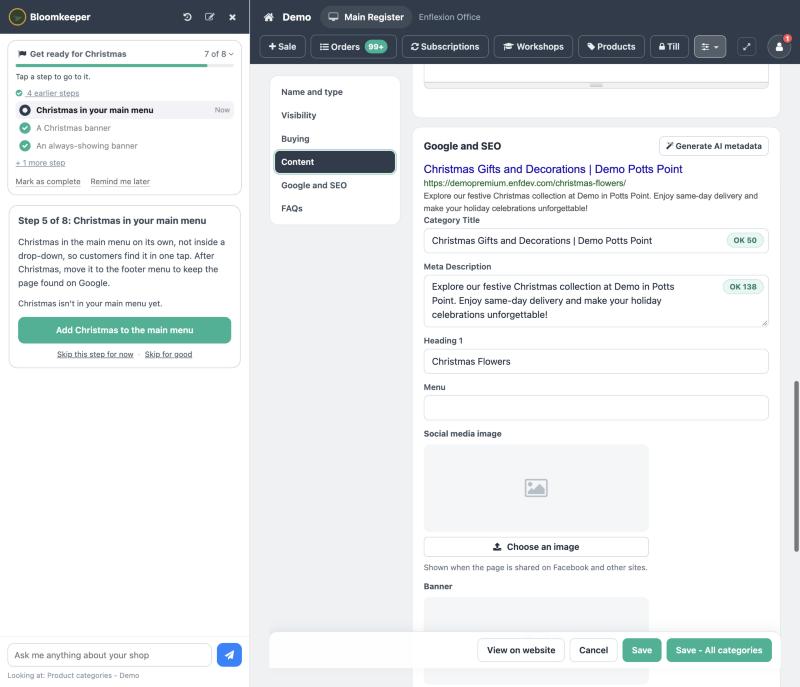
What Google will show for your Christmas page, with Generate AI metadata to write it for you.
Not doing one of them?
Every step can wait. Under each one you'll find Skip this step for now, which moves on and comes back to it at the end, and Skip for good, for anything that isn't right for your shop. At the top of the guide, Mark as complete ticks off a step you've done another way, and Remind me later puts the guide away until tomorrow.
When the last step is done, Bloomkeeper shows you everything that was set up, with a link to see your website.
Coming next: Christmas marketing campaigns
Getting your website ready is half the job. The other half is getting customers to order.
Over the next two weeks we're adding Christmas marketing campaigns to Bloomkeeper. These are ready-made campaigns with suggested words you can use or change, timed to go out at the right moments in the lead-up to Christmas. Bloomkeeper sets each one up with you. We'll let you know as soon as they're live.
When to start
Now. Christmas is a month away, and Google takes a few weeks to notice new pages, so your Christmas page and category are the ones not to leave until December.
If you get stuck, just ask Bloomkeeper. If it can't help, you can send your question to our support team with one click.
We wish you a happy Christmas, and a well-earned break over the holidays.
Drew