Bloomkeeper has been on for every store for a couple of weeks now, and the early results have been really encouraging.
A lot of you have jumped in and are at different stages of working through it.
What we are seeing so far
- New suburb pages are starting to rank. Where a shop had no page for a suburb, and so no ranking there at all, the new pages Bloomkeeper built are now starting to show up in Google.
- Improved pages are climbing. Where a shop already had suburb pages and Bloomkeeper improved them, those rankings are going up.
It is early days, but it is exactly what we hoped to see.
You have also been asking good questions. Here are the answers, all in one place.
If you are new to Bloomkeeper, start with Bloomkeeper Is Here for what it is and why we built it.
How long does setup take?
It depends on how much you want to put in. As a guide, set aside around 30 minutes for your first run through.
The brand voice step is where that time pays off most. The more of your own writing Bloomkeeper has to learn from, the more its drafts sound like your shop.
I started setup but did not finish. Does that matter?
Yes. Please go back and finish it.
Bloomkeeper cannot start using its new tools on your site until setup is complete. Open Bloomkeeper from the main top menu of your dashboard and it will pick up where you left off.
Will Bloomkeeper overwrite my existing pages?
Not unless you ask it to.
If you already have suburb pages, Bloomkeeper reviews each one. It checks the quality, and it checks that the page is not just a copy of your other suburb pages with the name swapped.
If a page is good, it leaves it alone. No suggestions, no changes.
If a page needs work, you choose what happens next:
- Write a brand new draft. Start fresh.
- Edit it yourself. Keep the page and make your own changes.
- Create a draft based on the existing page. Keep what works and let Bloomkeeper improve the rest.
Whatever you choose, a draft is still a draft. It waits for your approval, based on the mode you have set.
Any tips for getting started?
Keep it simple. Follow the steps and answer what it asks. You do not need to know anything about SEO to use it.
If the screen ever seems to ignore you, refresh the page and carry on.
Can I use Bloomkeeper before my new website is live?
Not yet. Bloomkeeper needs your website live on your own domain, because it checks your real rankings and reads your real pages. If you are moving across to us from another platform, hold off on your suburb pages until your site goes live, then let Bloomkeeper build them.
Where does Bloomkeeper get its information about my shop?
From the settings you already have in your dashboard. That includes:
- Your address
- Your pickup locations
- Your same day cut off times
- Your same day pickup times
- The suburbs and regions you deliver to
It also reads your about page and your homepage, so it understands how you describe your own shop.
This is why it is worth checking your dashboard settings are up to date. If your cut off time changed last year and never got updated, Bloomkeeper will not know.
Why does Bloomkeeper say it did not find any pages to review?
Usually because it has not finished looking yet.
Bloomkeeper does not do everything instantly. It looks up real search numbers for every suburb you deliver to, and that takes time, so the work is queued and done in the background. If it says it found nothing, skip that step for now and come back later. The results will be waiting.
It is also worth checking you have set up your suburb page template. That is the step that tells Bloomkeeper what your suburb pages should look like.
Why do some suburb pages have more unique content than others?
It comes down to how many people are searching for that suburb.
- Suburbs people are searching for get content written specifically for that suburb. This goes at the top of the page, where it matters most to Google.
- Suburbs with little or no search traffic get a simpler page built from your suburb page template.
That way the effort goes where the customers are.
One thing to know: if you change your template after pages have already been created, or are already waiting in the queue, those pages will not update to the new template automatically.
Where do I find my suburb pages once they are approved?
In your dashboard, go to Marketing & SEO > SEO Tools > SEO Pages. You can view and edit any of your suburb pages there, including their FAQs.
I approved my pages but they are showing a "page not found" error
Give it a little while. Your site's cache takes some time to catch up after new pages go live. If they are still not showing after a few hours, get in touch and we will check it for you.
What am I approving when Bloomkeeper shows me my images?
You are not approving new images. These are images already on your site.
What you are approving is the alt text. That is a short description attached to each image that tells Google and AI tools what the image shows. It helps your images, and your pages, get found.
Should my SEO agency have access to Bloomkeeper?
There is no reason not to. Bloomkeeper does most of the groundwork an SEO agency would normally do. A good SEO person can use what it produces as a starting point and fine-tune from there.
Will Bloomkeeper review my content again?
Yes. Every month it does a sweep of your site and looks for ways to improve your content.
Websites drift. Products change, seasons change, a page that ranked well starts slipping. The monthly sweep catches that so you do not have to.
If you think some pages need more work, or some FAQs are not quite right, you do not have to wait for the monthly sweep. You can edit them yourself any time in SEO Pages.
How often does Bloomkeeper check my rankings?
It depends on how much traffic a search gets.
High value searches, the ones that bring real customers to florists in your area, are checked weekly. Lower value searches are checked less often, monthly or longer.
That way the searches that matter most to your sales always have fresh numbers.
Where do my rankings and AI visibility numbers come from?
We use a number of sources, drawing on data from Google, OpenAI, Anthropic and others.
Is the information always accurate?
No, and we would rather be upfront about that.
Like every AI tool, Bloomkeeper can sometimes get things wrong. For the details that really matter to your customers, like your cut off times and delivery options, it has guardrails built in. It uses your actual dashboard settings for those rather than guessing.
Should I check everything Bloomkeeper writes?
You will always get a better result if you read content before it goes live. You know your shop and your customers better than any software does.
But it is your call. That is what the three modes are for:
- Do It All For Me. Bloomkeeper gets on with safe, sensible changes on its own.
- Alert Me To Important Changes. It works quietly and flags anything worth your attention.
- I Want To Approve Everything. Nothing goes live until you say yes.
Can you guarantee results?
No. Nobody can honestly guarantee results in search engine optimisation or AI visibility, and you should be wary of anyone who does.
What we can tell you, from 25 years of doing this, is that the shops that follow the plan get better results and grow their sales.
Important: turn off card surcharges by 30 September
This one is not about Bloomkeeper, but it needs your attention this week.
The Reserve Bank's ban on card surcharges is coming into effect. You need to turn off all credit card and PayPal surcharges on your website by the end of September.
We will be removing the surcharge option from the platform in the coming days. But it is your responsibility to make sure surcharges are off on your own site.
To turn them off: go to Settings > Payment Options in your dashboard.
The ban includes PayPal. PayPal has also changed its terms to stop surcharges being charged through its platform.
Better email delivery with Amazon SES
We are moving the emails your dashboard sends over to Amazon SES, Amazon's email sending service. It is one of the most trusted sending services in the world, used by some of the biggest online stores around.
Why does this matter? Because an email that lands in junk is an email your customer never sees.
- Order confirmations are more likely to reach your customer's inbox, so they know their order is in.
- Emails to your customers are less likely to be caught by spam filters.
- Fewer "did you get my order?" calls for you to answer on a busy day.
Gmail, Outlook and the other big email providers have become much stricter about which emails they trust. Sending through Amazon SES puts your shop's emails on the right side of those checks.
What is coming next
Behind all of this, we have been working on some big things.
- A full platform update. Arriving in the coming weeks, with a brand new checkout and much faster pages.
- Subscriptions. In testing now, and releasing alongside the platform update.
- Stripe Connect. We are adding Stripe Connect to open up a wide range of new payment options. If you use Stripe, you will need to update in the coming weeks to use the new tools. We will walk you through it.
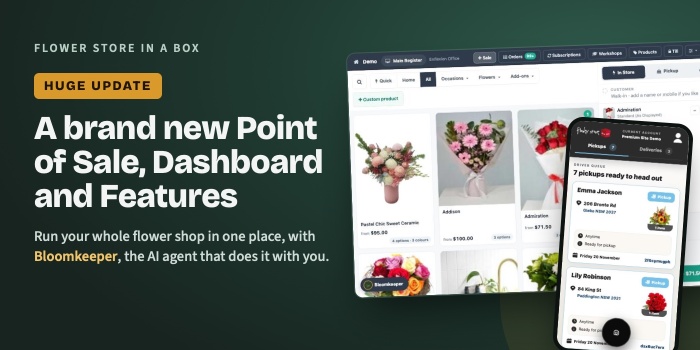
- A new order management and point of sale system. For manual and in-shop orders, fully built into the platform so everything lives in one place.
We will share more on each of these as they land.
Quick summary
- Set aside around 30 minutes for your first Bloomkeeper setup
- Started setup but did not finish? Go back and complete it so Bloomkeeper can start using its new tools
- It will not overwrite your existing pages unless you ask it to
- It builds content from your dashboard settings, your about page and your homepage
- Some work is queued rather than instant, so if a step shows nothing yet, come back later
- Suburbs with real searches get unique content; quieter suburbs use your template
- Find and edit your approved suburb pages in Marketing & SEO > SEO Tools > SEO Pages
- It reviews your content every month and checks important rankings weekly
- It can get things wrong, so reading drafts before they go live always gives a better result
- Turn off all card and PayPal surcharges in Settings > Payment Options by 30 September
- Dashboard emails are moving to Amazon SES, so order confirmations and customer emails are more likely to reach the inbox
- A new checkout, subscriptions, Stripe Connect and a new point of sale system are on the way
Any questions?
Submit a support request from your dashboard, or call us on 1300 730 560.